
Quick Answer
The best PowerPoint slide size in 2026 is Widescreen 16:9. It measures 13.333 x 7.5 inches, 33.867 x 19.05 centimeters and 1280 x 720 pixels at PowerPoint's default 96 DPI. Use Standard 4:3 (10 x 7.5 inches) only for older projectors and match your paper size when slides will be printed. Set the size before you design, because changing it later can stretch or crop your content. Export at higher resolution when image sharpness matters and note that Google Slides defaults to 10 x 5.625 inches. PitchWorx, a PowerPoint design agency with 14 years of experience, builds most client decks in 16:9.
Picking a slide size looks small, yet it controls how every chart, image and line of text appears on screen. The wrong choice leads to black bars on a projector, blurry exports and hours of manual fixes.
This guide gives exact measurements in inches, pixels and centimeters, plus the hacks our team uses weekly. We are a PowerPoint design agency, so we see slide size mistakes in client files almost daily.
Table of Contents
- Quick Answer
- PowerPoint Slide Size Chart: Inches, Pixels & Centimeters
- Which PowerPoint Slide Size Should You Choose in 2026?
- Growth Chart: How the Slide Canvas Has Expanded
- Facts About PowerPoint Slide Size You Should Know
- Case Study: Rescuing a 4:3 Investor Deck for a Boardroom Screen
- Hacks From a PowerPoint Design Agency: 5 Slide Size Fixes
- Free Tools to Check and Convert Slide Size
- Why Teams Trust PitchWorx for Presentation Work
- FAQs
PowerPoint Slide Size Chart: Inches, Pixels & Centimeters
Microsoft specifies slide sizes in inches, so pixel values depend on export resolution. The pixel figures below assume 96 DPI, the PowerPoint default on Windows.
| Format | Ratio | Inches (W x H) | Centimeters (W x H) | Pixels at 96 DPI |
|---|---|---|---|---|
| Widescreen (default) | 16:9 | 13.333 x 7.5 | 33.867 x 19.05 | 1280 x 720 |
| Standard | 4:3 | 10 x 7.5 | 25.4 x 19.05 | 960 x 720 |
| On-screen Show (16:9) | 16:9 | 10 x 5.625 | 25.4 x 14.288 | 960 x 540 |
| On-screen Show (16:10) | 16:10 | 10 x 6.25 | 25.4 x 15.875 | 960 x 600 |
| Custom for Full HD export | 16:9 | 20 x 11.25 | 50.8 x 28.575 | 1920 x 1080 |
Presets are from Microsoft Support. Pixels equal inches x 96. The Full HD row is custom.
Which PowerPoint Slide Size Should You Choose in 2026?
Choose Widescreen 16:9 for almost everything. Laptops, TVs, video calls and modern projectors use 16:9 displays, so slides fill the screen without bars. PowerPoint has defaulted to 16:9 since 2013. As a PowerPoint design agency, we start every screen-based project here.
Choose Standard 4:3 only when you must. Older projectors and some academic submissions still specify it. On a 16:9 screen, a 4:3 slide fills just 75 percent of the width.
Choose a paper size for print. A 16:9 slide rarely fits Letter or A4 paper without margins. For handouts, set a custom size of 11 x 8.5 inches (US Letter landscape) or 11.69 x 8.27 inches (A4 landscape).
Watch the Google Slides difference. Its 16:9 default is 10 x 5.625 inches, smaller than PowerPoint's 13.333 x 7.5, though the ratio matches. Size your images by ratio, not raw pixels.
Growth Chart: How the Slide Canvas Has Expanded
Slide canvases keep growing as screens improve. The chart below shows slide width in pixels at 96 DPI for each generation, from classic 4:3 to a 4K export.
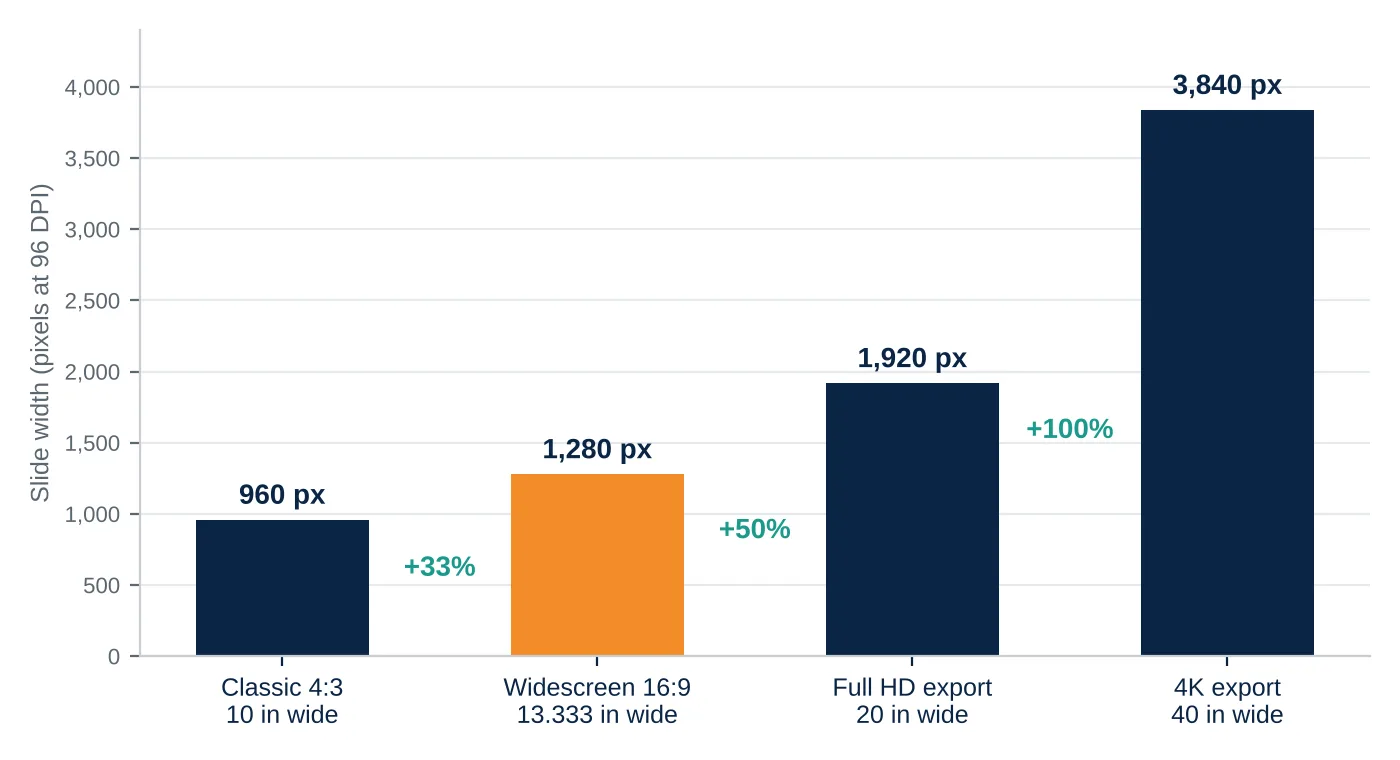
Slide width in pixels at 96 DPI. A 4K slide is 40 inches wide, inside PowerPoint's 56-inch limit.
Moving from 4:3 to widescreen adds 33 percent more horizontal space. A bigger canvas does not guarantee sharper slides, though. Export resolution decides sharpness, so Presentation design services usually design at 13.333 x 7.5 inches and export at the resolution each channel needs.
Facts About PowerPoint Slide Size You Should Know
- The 16:9 widescreen setting is the default for new presentations, and a size change applies only to the file you are editing.
- Two presets are called 16:9: Widescreen (13.333 x 7.5 inches) and On-screen Show (10 x 5.625 inches), identical in Normal view.
- Exporting a default slide as an image gives 1280 x 720 pixels at 96 DPI, or 4000 x 2250 pixels at 300 DPI for print.
- One PowerPoint file supports a single slide size, so mixed formats need separate files.
Case Study: Rescuing a 4:3 Investor Deck for a Boardroom Screen
Anonymized scenario based on common client situations.
The problem. A growth-stage software company arrived with a 38-slide investor deck built in 4:3. On the boardroom's 16:9 display, every slide showed wide empty bars and small charts. The in-house team had tried switching to Widescreen with Maximize, which cropped footers and clipped chart labels.
The fix. PitchWorx, a PowerPoint design agency, duplicated the file and set Widescreen 13.333 x 7.5 inches first, choosing Ensure Fit. We rebuilt layouts on a grid that used the extra 3.333 inches of width, a 33 percent gain, and replaced pasted chart images with native, editable charts.
The result. The deck filled the screen edge to edge, chart labels became readable from the back of the room, and the team now keeps a locked 16:9 master. This is typical when presentation design services start with slide size instead of fixing it at the end.
Hacks From a PowerPoint Design Agency: 5 Slide Size Fixes
These five habits take less than a minute each.
- Set the size first. Open Design, then Slide Size, before adding any object. Resizing later forces PowerPoint to scale everything.
- Know Maximize versus Ensure Fit. Maximize enlarges content and may crop it. Ensure Fit shrinks' content so nothing is lost. When in doubt, choose Ensure Fit.
- Use 20 x 11.25 inches for Full HD exports. At 96 DPI that custom size exports as exactly 1920 x 1080 pixels. Apply it on new decks only.
- Keep a half inch safe margin. Keep text and logos at least 0.5 inch from every edge, because some projectors crop the borders slightly.
- Save a locked template. Store your size, fonts and colors in a slide master so every new deck starts correcting.
| Designer Tip from Kavya Kavya, a presentation designer at our PowerPoint design agency, always tests the deck on the real display before the final export. A slide that looks perfect on a laptop can show cropped edges or tiny text on a boardroom screen. |
|---|
Free Tools to Check and Convert Slide Size
You do not need paid software to get this right. Our PowerPoint design agency team uses these free options daily.
- PowerPoint for the web: free with a Microsoft account. Open Design, then Slide Size.
- Google Slides: free with a Google account. Open File, then Page setup, to pick 4:3, 16:9, 16:10 or a custom size.
- Canva (free plan): start a custom-size design in seconds. Its presentations use 1920 x 1080 pixels.
- The inches x 96 formula: multiply any slide dimension in inches by 96 to get pixels at 96 DPI.
Why Teams Trust PitchWorx for Presentation Work
PitchWorx has 14 years of experience in the design industry, trusted since 2012, with 500+ brands supported and ISO 27001 certification. Our clients span the USA, UK, UAE and India. As a PowerPoint design agency, we work with Technology and SaaS, Consumer and Retail, Healthcare, Financial Services, Non-profit and Public sector, Education, Real Estate, and Food and Beverage companies, and more than 25 industries in total.
Our presentation design services cover pitch decks, investor decks, sales presentations and complete PowerPoint template systems, so the right slide size is locked in from the first slide.
Beyond slides, PitchWorx also delivers brand identity, marketing creatives, web design and development, video and motion, print and outdoor, books and magazines, and illustration and infographics. If you are comparing the Best Presentation design subscription options, the PitchWorx Creative Assist plan starts at $699 per month with unlimited design requests and a 7-day trial.
FAQs
What is the default PowerPoint slide size?
The default is Widescreen 16:9 at 13.333 x 7.5 inches (33.867 x 19.05 centimeters), which equals 1280 x 720 pixels at 96 DPI.
Is 16:9 or 4:3 better for presentations?
16:9 suits nearly all screens, including laptops, TVs and video calls. Choose 4:3 only for older projectors or when a submission requires it.
How do I change the slide size in PowerPoint?
Open the Design tab, select Slide Size, and choose Standard (4:3), Widescreen (16:9) or Custom Slide Size. Then pick Maximize or Ensure Fit.
What slide size is best for printing?
Match the paper: 11 x 8.5 inches for US Letter landscape or 11.69 x 8.27 inches for A4 landscape. For screen decks, export a PDF handout instead.
Does slide size change image quality?
Slide size controls layout, while export resolution controls sharpness. A default slide exports at 4000 x 2250 pixels at 300 DPI. If you manage many decks, a PowerPoint design agency can build locked templates, so every export stays consistent.
Related Blog: PowerPoint Slide Size & Dimensions Explained (16:9 vs 4:3)