

Quick Answer
The 5x5 rule in PowerPoint means no more than five words per line and no more than five lines per slide. That caps a slide at 25 words, so the audience listens to you instead of reading. Some versions add a third limit: no more than five text-heavy slides in a row. Treat it as a guardrail, not a law. Break it for data tables, technical diagrams, legal wording and reading decks that people open without a presenter. PitchWorx, a PowerPoint design agency with 14 years of experience, applies the rule to pitch and keynote slides and relaxes it where clarity needs detail.
Table of Contents
- What the 5x5 Rule Means
- Why the 5x5 Rule Works
- When to Break the 5x5 Rule
- Growth Chart: How Fast Word Counts Grow When Rules Loosen
- Facts and Figures About the 5x5 Rule
- Case Study: A Fintech Sales Deck That Needed Two Versions
- 5 Hacks from a PowerPoint Design Agency to Apply the Rule
- Free Tools to Apply the 5x5 Rule
- About PitchWorx and Our Other Services
- FAQs About the 5x5 Rule in PowerPoint
Everyone has sat through a slide packed with tiny paragraphs while the speaker read it aloud. The 5x5 rule exists to stop that. It is simple enough to remember mid-edit, which is why it is one of the most quoted PowerPoint guidelines.
Rules without context cause problems, though. Cut too hard and a financial slide becomes meaningless. This guide explains the rule, shows when to bend it and shares the fixes our team uses. We are a PowerPoint design agency, and we break this rule on purpose every week.
What The 5x5 Rule Means
The rule has two core limits: five words per line and five lines per slide. Some versions add a third, which is why you will also see it called the 5x5x5 or 5/5/5 rule. A close cousin, the 6x6 rule, is slightly looser.
| Rule | Words per line | Lines per slide | Max words per slide | Extra limit |
|---|---|---|---|---|
| 5x5 | 5 | 5 | 25 | None |
| 5x5x5 | 5 | 5 | 25 | 5 text-heavy slides in a row |
| 6x6 (1x6x6) | 6 | 6 | 36 | One thought per line |
Maximum words equal words per line times lines per slide. Versions of these rules vary slightly between sources.
Why The 5x5 Rule Works
People cannot read and listen at once. When a slide holds full sentences, the audience starts reading and stops hearing you. Attention splits between the page and the presenter, and the presenter loses.
Working memory is small. George Miller's 1956 figure of about seven items was a rough estimate, and Nelson Cowan later argued the pure limit is closer to four chunks. Either way, a dozen separate ideas on one slide is too many.
The number five is a shortcut. It is a memorable stand-in for the word short, which makes it easy to use under deadline pressure.
When To Break The 5x5 Rule
Even fans of the rule call it flexible, because clarity matters more than counting. Break it deliberately here:
- Data and technical slides. Tables, financial statements and architecture diagrams need labels that no 25-word cap can hold.
- Reading decks. Investor leave-behinds, board packs and sales decks sent by email have no speaker to carry the detail, so the slides must.
- Legal, compliance and medical content. Required wording cannot be shortened just to fit a rule.
- Quotes and definitions. One strong quote can run longer if it is the only thing on the slide.
One test settles most cases: does every extra word help the audience decide or act? If not, cut it. A good PowerPoint design agency makes that call slide by slide.
Growth Chart: How Fast Word Counts Grow When Rules Loosen
Loosening a text rule by one word per line looks harmless, but the limit multiplies across lines.
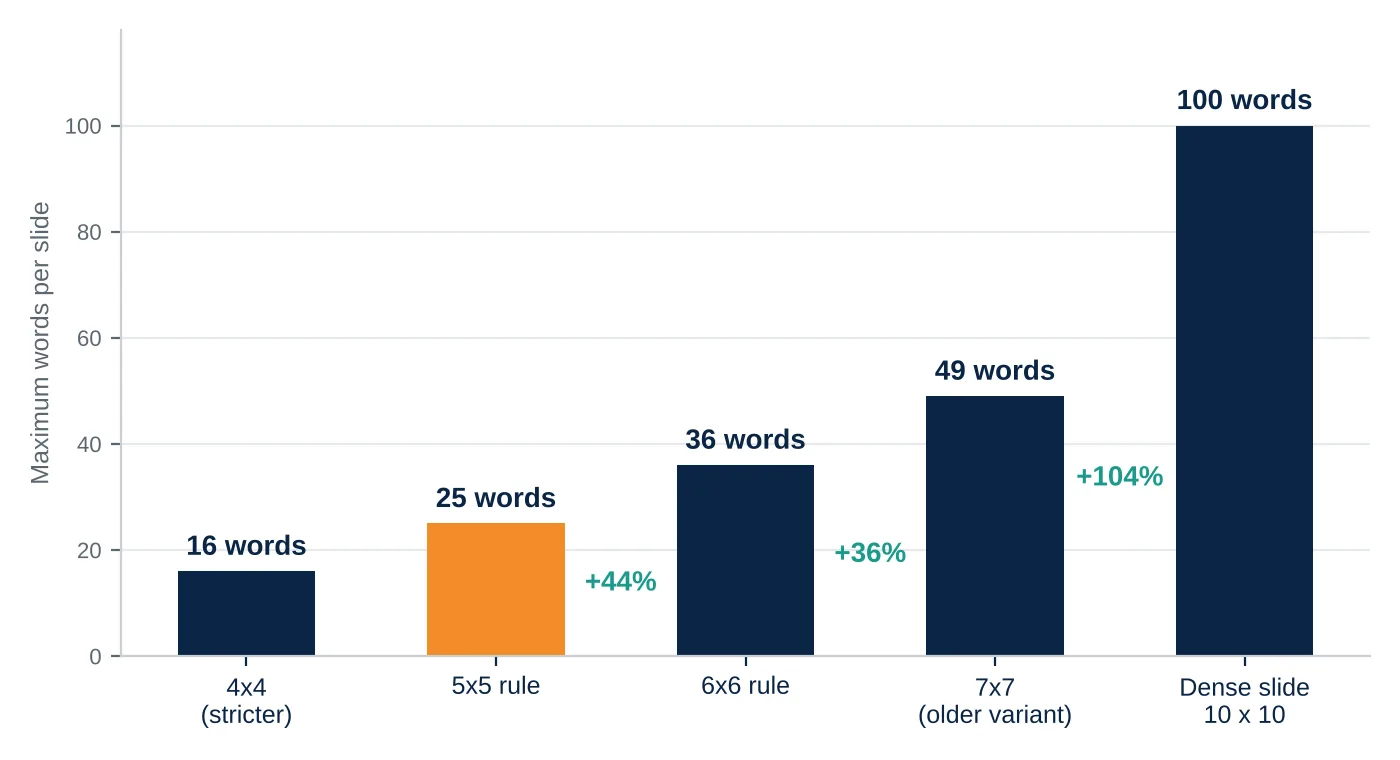
Maximum words per slide equals words per line times lines per slide. The dense slide is a 10 x 10 example.
Moving from 5x5 to 6x6 adds 11 words, a 44 percent jump, and a dense 10 x 10 slide carries four times the text. Strong presentation design services use this math to show why small additions snowball into walls of words.
Facts And Figures About the 5x5 Rule
- A 5x5 slide holds a maximum of 25 words, while the 6x6 rule allows up to 36.
- Miller's seven items was meant as a rough estimate and a rhetorical device, and Cowan's later work points to about four chunks.
- PowerPoint's Outline View (View, then Outline View) shows every word in the deck on one screen, which makes a text audit take minutes.
Case Study: A Fintech Sales Deck That Needed Two Versions
Anonymized scenario based on common client situations.
The problem. A fintech sales team used one 30-slide deck for live demos and email follow-ups. Slides were full of paragraphs, reps read them aloud, and prospects could not spot the main point. When the team cut everything to 5x5, follow-up readers asked where the detail went.
The fix. Our PowerPoint design agency split the file into two layers. The main flow follows the 5x5 rule with one idea per slide and the story in speaker notes. A separate appendix breaks the rule on purpose, with clean tables for readers.
The result. Reps stopped reading slides aloud, prospects could request detail without cluttering the pitch, and one master file served both uses. Presentation design services often use this two-layer approach.
5 Hacks from A PowerPoint Design Agency to Apply the Rule
These habits, used daily by our Presentation design services team, turn the rule into a faster workflow.
- Write it long, then cut. Draft the full thought, then keep only the nouns and verbs. Most slides survive losing half their words.
- Audit in Outline View. One screen of all your text shows which slides drift past the limit.
- Move detail to notes and an appendix. The audience hears the story from you and finds the proof later.
- Swap lines for a visual. A single big number, an icon row or a simple chart often replaces three bullets.
- Split, never shrink. If text needs more room, make a second slide. Dropping below about 24 pt to fit words is a sign the slide is overloaded.
| Designer Tip from Kavya Read the slide aloud once before you present. If you are repeating every word on it, the slide is doing your job. The slide should carry the headline, and your voice should carry the story. |
|---|
Free Tools to Apply the 5x5 Rule
You do not need paid software to tighten your slides:
- PowerPoint for the web: free with a Microsoft account, and it includes Outline View for text audits.
- Google Slides: free, collaborative and easy for quick edits with a team.
- Canva free plan: clean templates with built-in space for short text.
- Hemingway Editor: free in the browser, and it flags long sentences you can shorten.
About PitchWorx and Our Other Services
PitchWorx is a PowerPoint design agency with 14 years of experience in the design industry, trusted since 2012. We have worked with 500+ brands, including Pepsi, Samsung, Honeywell, Bloomberg and Caterpillar, across 25+ industries, including technology and SaaS, consumer and retail, healthcare, financial services, non-profit and public sector, education, real estate, and food and beverage.
Our presentation design services cover investor pitch decks, sales decks, product presentations, AGM decks and annual report decks. Beyond slides, we offer brand identity, marketing creatives, web design, video and motion, print and outdoor, books and magazines, and illustration and infographics. For ongoing needs, Creative Assist is the best presentation design subscription for teams that want unlimited requests, editable files and most deliveries within 72 hours, at $699 per month with a 7-day free trial.
FAQs About the 5x5 Rule in PowerPoint
What is the 5x5 rule in PowerPoint?
It limits each slide to five words per line and five lines of text, for a maximum of 25 words, so the audience listens to the speaker instead of reading.
Is the 5x5 rule the same as the 5x5x5 rule?
They are close. The 5x5x5 version adds a third limit of five text-heavy slides in a row, so decks do not become repetitive. Many people use the names interchangeably.
Do titles count toward the five lines?
Practices differ. Most designers count the title separately but keep it to one short line. What matters is that the slide reads in a few seconds.
Is the 5x5 rule outdated, and what is the 6x6 rule?
It is a useful starting point, not a strict law. The 6x6 rule allows six words per line and six bullets, with one thought per line. Our PowerPoint design agency usually starts at 5x5 and adjusts from there.
How can a PowerPoint design agency help me apply the rule?
A designer edits your content down, builds clean layouts and decides where to break the rule. At PitchWorx, our PowerPoint design agency team also creates a reader version, so detail is not lost.