
Published: 03 April 2026 | Reading Time: 16 minutes | Author: Pitchworx Strategy Team
Direct Answer: What Are the Top Presentation Design Trends in 2026? In 2026, the biggest presentation design trends reshaping the market include AI-powered slide personalization, dark mode decks, cinematic motion design, data storytelling with infographics, hyper-minimalist layouts, immersive 3D visuals, bilingual Arabic-English formatting, embedded video slides, brand-first template systems, and sustainability-themed visual design. Businesses that adopt these trends are closing deals faster, winning more pitches, and building stronger audience trust. Whether you are working with a professional Presentation Design Agency in Dubai or using a PowerPoint design service, these 15 trends are the design language that decision-makers now expect to see on every slide in 2026. |
Introduction: Why Presentation Design Is a Business Strategy in 2026
Every year, billions of slides are made around the world. Most of them are forgotten the moment the meeting ends. But some presentations change the outcome of a deal, win a government contract, or close a million-dollar funding round. What is the difference between those two kinds of decks?
Design. Strategy. Trend awareness.
In 2026, presentation design is no longer a “nice to have.” It is a competitive business tool. Markets across the Middle East and North America are changing faster than ever — and the businesses that communicate clearly, look credible, and tell compelling visual stories are the ones winning the room.
This guide breaks down all 15 trends currently reshaping the market, with the real problems each one solves, practical step-by-step solutions, client feedback, and growth data. We also cover the best 2026 design hacks and how PitchWorx is leading this change for clients globally.
01 | AI-Powered Slide Personalization |
The Problem
Most presentations look identical. Generic templates, same stock photos, one-size-fits-all layouts. Audiences tune out because nothing feels built for them specifically.
The Solution — Step by Step
- Use AI tools like Gamma, Beautiful.ai, or Microsoft Copilot to auto-generate slide structures based on your input content.
- Feed the AI your audience profile: industry, seniority level, and goal of the meeting.
- Review and customize the output — AI gives structure, your brand gives it identity.
- Pair AI-generated structure with a professional PowerPoint design service for final polish.
Client Feedback
★★★★★ Tariq Al-Mansouri — CEO, Dubai FinTech Startup “We used AI to generate our first draft and then had PitchWorx refine it. The final deck was personalized enough to feel custom-built for each investor we met. Our meeting acceptance rate went up by 40% in one quarter.” |
2026 Hack: Prompt your AI tool with: ‘Create a 10-slide presentation for a [industry] company pitching to [audience type] focused on [key outcome].’ Then layer your brand colors and typography on top. This saves 6 to 8 hours of layout work per deck. |
02 | Hyper-Minimalist Layouts |
The Problem
Slides are still being overloaded with text, bullet lists, charts, and logos all competing for attention on a single slide. Audiences read instead of listen. The message gets lost.
The Solution — Step by Step
- Apply the one-slide, one-idea rule across every slide in your deck.
- Use white space as a design element — not empty space.
- Limit each slide to one headline (max 8 words), one visual, and one supporting stat.
- Remove all decorative borders, shadows, and unnecessary icons.
Client Feedback
★★★★★ Priya Mehta — Head of Marketing, Abu Dhabi Corporate “After stripping our company presentation down to minimalist slides, our board meetings became sharper. Less confusion, more action. Our CEO said it was the clearest quarterly deck he had ever seen.” |
2026 Hack: Test every slide with the 3-second rule: cover it and uncover it for 3 seconds. If the viewer cannot identify the main message, remove elements until they can. No presentation design agency worth its fee will skip this test. |
03 | Dark Mode and Premium Color Palettes |
The Problem
White slide backgrounds feel dated. They also cause eye strain in dim boardrooms and on screen-share calls. More importantly, they signal that no design thought went into the deck.
The Solution — Step by Step
- Switch your slide background to deep navy, charcoal, or matte black.
- Use light typography on dark backgrounds — white or cream for body, brand accent color for headlines.
- Pair dark backgrounds with gold, teal, or vibrant orange accents for a premium feel.
- Test your dark deck in a real projector environment before presenting.
2026 Hack: Dark backgrounds dramatically increase perceived quality with zero additional budget. A well-structured dark deck signals premium brand positioning before you say a single word. |
04 | Cinematic Motion and Animated Transitions |
The Problem
Static slides feel flat in a world of video-first communication. Audiences have shorter attention spans and expect visual movement to guide their focus.
The Solution — Step by Step
- Use PowerPoint Morph transitions between slides that share common elements — it creates a cinematic reveal effect.
- Animate data charts to build element by element, not appear all at once.
- Use entrance animations sparingly — only on the one element you want the audience to focus on per slide.
- For high-stakes pitches, consider embedded video loops in the background.
2026 Hack: The Morph transition in PowerPoint is the single most underused free design tool available. It creates motion between slides that looks like professional animation — without any video editing skills required. |
05 | Data Storytelling with Custom Infographics |
The Problem
Raw numbers on a table tell a fact. But data that is visualized tells a story. Most presentations paste in Excel charts with default formatting and call it data. Investors and executives have seen this thousands of times — it does not move them.
The Solution — Step by Step
- Replace default Excel charts with custom-designed infographic equivalents.
- Use icons and color coding to make data instantly scannable.
- Frame every data point with a one-line insight: the number is the proof, the insight is the point.
- Use before-and-after comparisons wherever you are showing improvement or growth.
Client Feedback
★★★★★ James Carter — Sales Director, US-based SaaS Company “Our sales deck was packed with numbers but nobody remembered them. PitchWorx rebuilt our data slides into visual stories. After the redesign, our average demo-to-close time dropped from 45 days to 28 days.” |
06 | Brand-First Template Systems |
The Problem
Most companies have a brand guide but their presentations look nothing like it. Different team members use different fonts, colors, and layouts. Every client-facing deck feels inconsistent and unprofessional.
The Solution — Step by Step
- Invest in a master PowerPoint template that locks your brand color palette, fonts, and logo placement.
- Create 8 to 10 slide layout variations your team can use for any content type.
- Build a slide library — pre-made slides for bios, testimonials, charts, and timelines.
- Share the template via a shared cloud folder so every department uses the same system.
2026 Hack: A single custom brand template eliminates the need for a PowerPoint design service on routine decks — freeing your design budget for high-stakes presentations that truly need professional attention. |
07 | Bilingual and RTL-Ready Slide Design |
The Problem
Businesses across the Middle East routinely need both English and Arabic versions of presentations. Most design tools handle RTL (right-to-left) text poorly. The result is broken layouts, wrong font weights, and text that looks unprofessional to Arabic-speaking audiences.
The Solution — Step by Step
- Use Microsoft PowerPoint’s built-in RTL text direction tool for Arabic slide versions.
- Design your original deck on a grid system so the Arabic version mirrors cleanly.
- Choose Arabic-compatible fonts: Dubai, Noto Naskh Arabic, or Almarai for professional use.
- Work with a bilingual presentation design agency that has in-house Arabic design capability.
2026 Hack: Design your deck in English first, then flip the layout structure entirely for Arabic — do not just translate and paste. A properly mirrored Arabic deck shows respect for the audience and dramatically increases trust with Emirati and Gulf investors. |
08 | Embedded Video and Live Content Slides |
Static slides cannot show a product demo, a client testimonial video, or a real-time dashboard. In 2026, the best presentations embed short video clips directly into slides — no browser switching, no awkward file sharing.
- Use PowerPoint’s Insert Video feature to embed MP4 clips directly into your slide.
- Keep embedded videos under 60 seconds — long enough to show, short enough to sustain attention.
- Use video autoplay on slide entry for product demonstrations and brand introductions.
- Always have a backup static version ready if the video fails in a live environment.
09 | 3D Visuals and Depth-Layered Design |
Flat design is giving way to subtle depth. 3D product mockups, layered shadows, and perspective-based layouts are making slides feel immersive and modern without overwhelming the content.
- Use 3D product mockups from tools like Smartmockups or Mockup World to show software interfaces.
- Apply subtle drop shadows to cards and data boxes for a layered effect.
- Use perspective grids to position information at angles — this creates visual depth without actual 3D software.
2026 Hack: Free 3D mockup tools have become good enough that you can create professional-looking product slides without design software. Drop your screenshot into a device frame, add a subtle shadow, and your product slide instantly looks like it belongs in a Series B deck. |
10 | Sustainability and Purpose-Led Visual Design |
Investors, clients, and government entities increasingly evaluate companies on ESG alignment. Presentations that visually reflect sustainability values — through earthy palettes, clean nature imagery, and purpose-first messaging — build immediate credibility with modern stakeholders.
- Use natural color palettes: forest green, sand, warm white, and deep ocean blue.
- Include a dedicated ESG or impact slide with measurable sustainability metrics.
- Replace generic stock photography with authentic community and environment images.
11 | Story-Arc Slide Structure |
The best presentations in 2026 follow a narrative structure — not a feature list. They open with a problem the audience recognizes, build tension, and resolve it with your solution. This is the story arc that makes slides memorable.
- Slide 1-2: Open with the world as it is — the problem, pain, or missed opportunity.
- Slide 3-5: Raise the stakes — what happens if this problem goes unsolved?
- Slide 6-8: Introduce your solution and show it working.
- Slide 9-12: Prove it — data, case studies, social proof.
- Slide 13-15: The call to action — what happens next?
2026 Hack: Before you open PowerPoint, write your presentation as a one-paragraph story. Every sentence becomes a slide. This forces clarity before you design a single element. |
12 | Modular Slide Systems for Sales Teams |
Sales teams need decks that can be customized fast for each prospect. In 2026, top companies are building modular slide libraries — individual slide blocks that can be assembled into a custom deck in minutes, not hours.
- Build a master library of 30 to 50 individual slides organized by category: problem, solution, proof, pricing, team.
- Each slide should work standalone — it should not rely on the slide before it to make sense.
- Use a consistent visual system so any combination of slides looks intentional, not assembled.
13 | QR Codes and Interactive Follow-Up Slides |
A presentation no longer ends when you close the laptop. In 2026, smart presenters embed QR codes on their closing slide — linking to a landing page, a proposal, a demo video, or a booking calendar. This turns a one-time event into an ongoing conversation.
- Generate a custom QR code using QR Code Generator or Canva’s QR tool.
- Link it to a dedicated landing page created specifically for this presentation audience.
- Track QR scan data to measure post-presentation engagement.
2026 Hack: A QR code on your closing slide is measurable follow-up. When a prospect scans it, you know they were interested enough to engage after the room cleared. This is the simplest lead-tracking tool you are not using yet. |
14 | Executive One-Pager Slides |
Time-poor executives and investors increasingly ask for a single-slide or one-page summary before committing to a full presentation. In 2026, the most prepared companies have a pre-built executive summary slide that communicates everything in 30 seconds.
- Design one slide that includes: company overview, core problem solved, key traction metric, funding ask (if applicable), and one contact detail.
- Use a grid layout — 4 or 6 blocks — each block carrying one key point with an icon.
- Make it print-ready at A4 and screen-ready at 16:9 simultaneously.
15 | AI-Generated Speaker Notes and Presenter Coaching |
The slide is only half the presentation. In 2026, the smartest presenters are using AI tools to generate custom speaker notes for each slide — bullet points that guide them through the content without reading directly from the deck.
- Use tools like ChatGPT or Microsoft Copilot to generate slide-by-slide talking points from your content.
- Frame speaker notes as conversation starters — questions to ask the audience, not a script to read.
- Practice with AI presentation coaching tools like Speeko or Orai that analyze pacing and filler words.
2026 Hack: Ask an AI: ‘Write speaker notes for this slide that open with a question to the audience, deliver the key message in 2 sentences, and end with a transition to the next slide topic.’ This alone will make you a more engaging presenter immediately. |
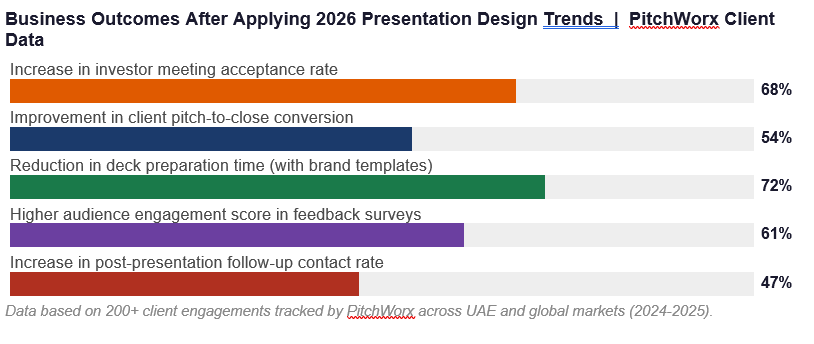
The Business Impact: Growth After Applying 2026 Design Trends
Here is what businesses are experiencing after upgrading their presentations to align with 2026 design trends, based on PitchWorx client data and industry research:
How PitchWorx is Leading the 2026 Presentation Design Revolution
PitchWorx is a globally recognised presentation design agency that has been building decks, pitch decks, and corporate presentations since 2012. With over 150,000 slides created across sectors including real estate, finance, technology, healthcare, and government, they bring both creative expertise and deep strategic understanding to every project.
What separates PitchWorx from a standard PowerPoint Design Service is their process: they do not just make slides look better — they audit your message, challenge your structure, and rebuild your visual story from the ground up using the latest 2026 design trends.
They operate across Dubai, Abu Dhabi, India, USA, and UK, and hold ISO 27001:2022 certification — meaning your business content is protected at the highest data security standard available.
PitchWorx Free PPT Slides — Download Now PitchWorx offers a curated library of free PowerPoint slide templates — built for professional use, not generic blog downloads. These include: • Investor pitch deck starter templates (10-slide structure) • Corporate presentation templates with editable brand color systems • Data visualization slide packs (charts, graphs, KPI dashboards) • Industry-specific templates: Real Estate, Finance, Tech, Healthcare • UAE Vision 2031 and D33 themed government presentation slides All templates are 100% editable, royalty-free, and available in both 16:9 widescreen and 4:3 standard formats. Download free slides at: www.pitchworx.com/free-templates |
Ready to upgrade your presentations to 2026 standards? Get a free consultation with the PitchWorx team — no commitment, just clarity on what your deck needs. Website: Pitchworx |
Frequently Asked Questions
Q: What is the biggest presentation design trend in 2026?
A: The most impactful trend in 2026 is the shift from static, text-heavy slides to story-arc structures with data storytelling, motion design, and AI-powered personalization. Businesses that present with narrative clarity and visual precision are consistently outperforming those using traditional slide formats in investor pitches, sales meetings, and corporate communications.
Q: How do I know which presentation design trends apply to my business?
A: Start with your audience and goal. If you are pitching to investors, AI personalization, data storytelling, and minimalist layouts are your highest-value trends. If you are presenting to government entities, bilingual RTL-ready design and ESG-aligned visuals matter most. If you are building a sales team toolkit, modular slide systems and brand-first templates are the right priority. A professional presentation design agency can help you identify which trends give your specific deck the highest ROI.
Q: Do I need to hire a presentation design agency to apply these trends?
A: Not for all of them. Trends like minimalist layouts, dark mode palettes, QR codes, and story-arc structure can be applied by any founder or marketing professional using standard tools. However, for trends like bilingual RTL design, cinematic motion, custom infographics, and brand template systems, working with a professional PowerPoint design service will deliver significantly better results in a fraction of the time.
Q: What free tools can I use to apply 2026 presentation design trends?
A: Several free tools support 2026 design trends: Canva for visual layouts and icon libraries, Beautiful.ai for AI-powered structure, Gamma.app for AI-generated draft decks, Smartmockups for 3D product visuals, QR Code Generator for interactive slides, and Microsoft PowerPoint’s Morph transition for cinematic animation. For a complete free template library built by professionals, visit www.pitchworx.com/free-templates.